
The mAT-S1500 is designed as an accurate instrument for monitoring station performance. It uses two RF specific measurement chips, which can accurately measure the power and SWR of the RF system, but cannot display information such as spectrum and impedance.
The mAT-S1500 features a 4.3" diagonal TFT color display screen that displays the current RF power and SWR using bar and digital displays.
The mAT-S1500 is an automated instrument that is very easy to use. It can automatically set the range based on the input RF signal. There are two switches on its rear panel: a power switch and a background setting switch. You can manually set the display background to black or white according to the brightness of the environment, which will make it easier for you to read the display information on the screen.
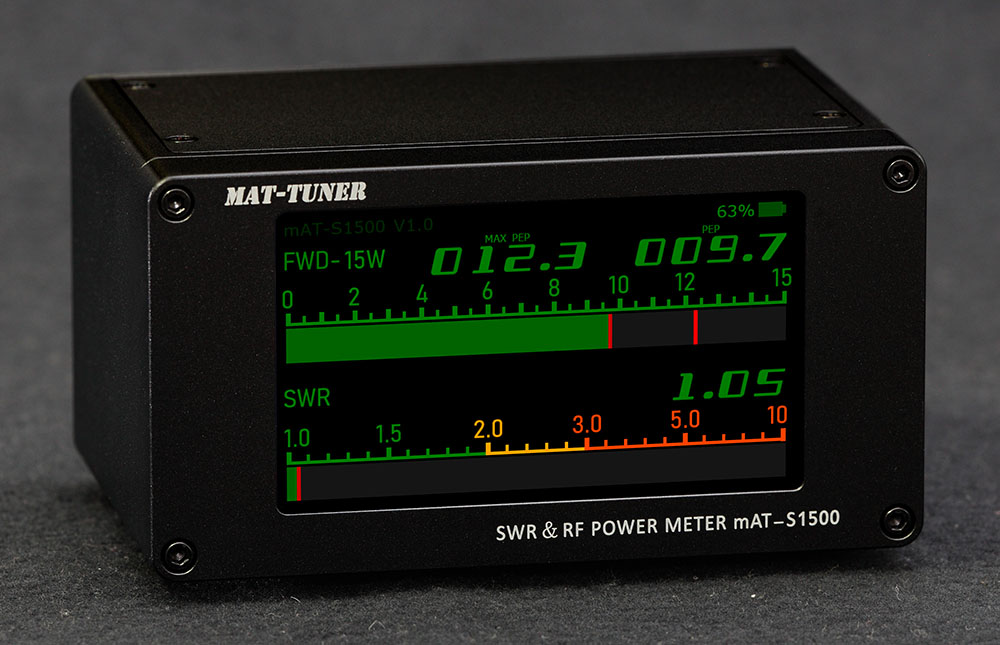
The shell of the mAT-S1500 is made using aluminum milling technology, which makes it very delicate and sturdy.
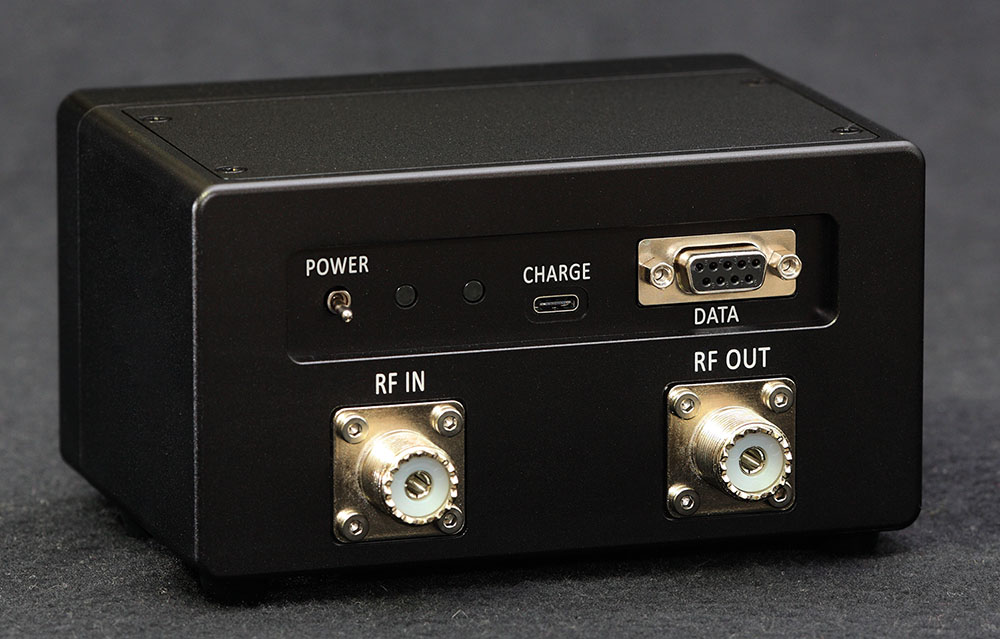
Dual Power Supply Options
Built-in Battery
This mAT-S1500 is equipped with two high capacity 18650 lithium batteries, which can operate without the need for additional power supply.
External Power
It has an external DC power socket. You can power it with an external power supply, the internal battery is no longer used. But this socket cannot charge the built-in battery.
Type-C Charging
By using the TYPE-C charging socket, users can easily use their phone charger to charge it. The charger is not an accessory to this instrument, and the user needs to prepare it themselves.
Important Battery Notes
Note 1: Please do not use this device when charging. The strong electromagnetic waves emitted by the transmitter may disrupt the charger, resulting in incorrect output voltage and damage to mAT-S1500. If mAT-S1500 detects that a charger is connected, a warning message will pop up to remind the user. The display screen of the mAT-S1500 consumes almost all of its electrical energy, and charging the mAT-S1500 during shutdown can greatly shorten the charging time.
Note 2: If the lithium battery inside the mAT-S1500 is reinstalled, please connect the charger to activate the protection circuit before it can start normally.
Front Panel Display
Display Information:
- FWD Power Display - Shows two data: maximum power and instantaneous power
- SWR Display - Shows SWR value with color-coded progress bar (green, yellow, monochrome)
- Battery Indicator - Top right side displays battery level and charging status
- Auto-Ranging - Automatically sets range (15W, 150W, 1500W) based on input RF signal
- Manual Display Background - Manually switch display background color: Set the display background to black or white by manually toggling the switch.
Power Measurement:
FWD displays two data: maximum power and instantaneous power. The first digit displays the maximum RF power, and the second data displays the instantaneous power. The following progress bar displays the instantaneous power, and the cursor on the right is used to mark the maximum power.
Range: FWD has three ranges, 15W, 150W, and 1500W. When the mAT-S1500 starts, the range is automatically set to 15W and an appropriate range is automatically set based on the input RF signal. The range will only be automatically set from small to large. If the user needs to return to a smaller range, simply turn off the power and restart. The scale of the progress bar will be automatically set according to the range.
Important: If you want to accurately measure RF power, please set your transmitter to FM, FSK, RTTY, CW mode, so that your transmitter can output a stable carrier wave.
Calibration Note
If you feel the measurement error of RF power is too large, you can open the top cover of the meter and calibrate the RF power display of the meter by adjusting the adjustable point position. The SWR display does not need to be calibrated, it is accurate.
SWR Measurement:
SWR also has two displays, number and progress bar. The display range is 1.00-9.99. If SWR displays 99.99, it indicates that the "RFOUT" socket is connected incorrectly or the antenna is invalid.
The progress bar will set different colors according to the value of SWR, which are green, yellow and monochrome. When the SWR is too high, mAT-S1500 will emit a beep to prompt the user.
Rear Panel
Rear Panel Connectors:
- RF IN - RF signal input. Connect the transmitter or amplifier.
- RF OUT - RF signal output. Connect the antenna or tuner.
- POWER - Power switch. Turn on the power supply upwards.
- BRT - Display background selection, black or white.
- CHARGE - Charging socket, TYPE-C type. 4.5 to 5.5V, less than 1A.
- DC - External DC power input (12-14V, Max 1A).
Additional Features:
There is an indicator light on the left side of the charging socket, which will be illuminated during charging. After the battery is fully charged, this indicator light goes out.
Charging Safety
The mAT-S1500 does not come with a charger. Users can use the TYPE-C charger of most mobile phones to charge it. The charging voltage range is 4.5-5.5V, exceeding the range will damage this meter. The maximum charging current should not exceed 1A.
Technical Specifications
| Power Range | Auto-ranging, 15, 150 and 1500 watts |
|---|---|
| Power Accuracy | +/- 5% at 7 MHz |
| Frequency Range | 1.8 to 54 MHz |
| SWR Range | 1.00 to 9.99 |
| SWR Accuracy | Within 3%, 1.8 to 30MHz |
| Display | 4.3" diagonal TFT color display screen |
| Charging | 4.5 to 5.5V, less than 1A, less than 5 hours |
| Battery | Two high capacity 18650 lithium batteries (built-in) |
| External Power | DC 12-14V, Max 1A |
| Dimensions | 14.1cm x 10.9cm x 8.1cm (5.6"W x 4.3"D x 3.2"H) |
| Weight | 1.21 Kg |
| Construction | Aluminum milling technology shell |
Shipping Instructions
mAT-S1500 has two built-in lithium batteries, which may be restricted during transportation. Please comply with relevant laws and requirements.
Technical Support
Visit the web: http://www.mat-tuner.com/ for more information and operations manual. We recommend purchasing our products from your local distributor for better service.